nginx images 的 docker-entrypoint.sh 閱讀

前言

因為現在 Cloud-native 的觀念越來越盛行,container image 是基礎
如果要自己寫 image 的話,就有一些眉角需要注意一下,其中一個我覺得蠻重要的就是 entrypoint 的設計 (如果設計不好可能 container 隨時就掛了)

之前也有用過 mysql 的 image, 他提供了一個 docker-entrypoint.d 來讓使用者放入 .sh,.sql 檔案,這樣在啟動的時候就可以預先載入使用者寫好的資料表,之後有機會再來深入探究
那這次使用的 image 為 dockerhub.io/nginx:1.20
先使用 docker inspect nginx:1.20 來觀察一下他的 entrypoint, cmd 分別是怎麼設計的

/entrypoint.sh 觀察
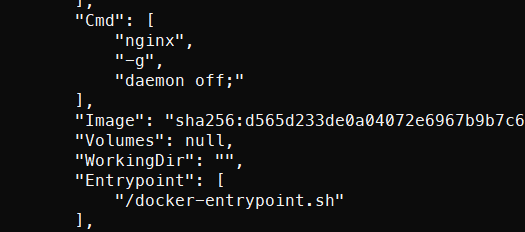
docker inspect 結果

可看到 entrypoint/docker-entrypoint.sh 這隻程式
cmd 則為 nginx -g daemon off
接下來就可以直接看 /docker-entrypoint.sh 是如何設計的

/docker-entrypoint.sh 完整檔案

1
2
3
4
5
6
7
8
9
10
11
12
13
14
15
16
17
18
19
20
21
22
23
24
25
26
27
28
29
30
31
32
#!/bin/sh
# vim:sw=4:ts=4:et
set -e
if [ -z "${NGINX_ENTRYPOINT_QUIET_LOGS:-}" ]; then
exec 3>&1
else
exec 3>/dev/null
fi
if [ "$1" = "nginx" -o "$1" = "nginx-debug" ]; then
if /usr/bin/find "/docker-entrypoint.d/" -mindepth 1 -maxdepth 1 -type f -print -quit 2>/dev/null | read v; then
echo >&3 "$0: /docker-entrypoint.d/ is not empty, will attempt to perform configuration"
echo >&3 "$0: Looking for shell scripts in /docker-entrypoint.d/"
find "/docker-entrypoint.d/" -follow -type f -print | sort -V | while read -r f; do
case "$f" in
*.sh)
if [ -x "$f" ]; then
echo >&3 "$0: Launching $f";
"$f"
else
# warn on shell scripts without exec bit
echo >&3 "$0: Ignoring $f, not executable";
fi
;;
*) echo >&3 "$0: Ignoring $f";;
esac
done
echo >&3 "$0: Configuration complete; ready for start up"
else
echo >&3 "$0: No files found in /docker-entrypoint.d/, skipping configuration"
fi
fi
exec "$@"

接下會以兩個區段來看,分別是:

  1. 基本設定區段
  2. docker-entrypoint.d 目錄檢查區段

1.基本設定區段

1
2
3
4
5
6
7
8
9
10
11
12
13
14
#!/bin/sh
# vim:sw=4:ts=4:et
# set -e 遇到錯誤直接結束程式
set -e
# 檢查變數
if [ -z "${NGINX_ENTRYPOINT_QUIET_LOGS:-}" ]; then
exec 3>&1
else
exec 3>/dev/null
fi
# 這邊先這樣,主要是搭配最後的 exec
if [ "$1" = "nginx" -o "$1" = "nginx-debug" ]; then
...
exec "$@"

先把開頭跟結尾分開來
第二行的 vim:sw=4;ts=4;et 是跟 vim 編輯器縮排的有關
set -e 則是當程式內有回傳非 0 時 (表示執行失敗) 就立刻結束
接下來的 if [ -z "${NGINX_ENTRYPOINT_QUIET_LOGS:-}" ] 則是檢查這個環境變數是否有存在,有的話則會把 Log 透過管線丟出來,否則就丟到 /dev/null
最後透過 $1 來檢查 cmd 是帶什麼,如果是 nginx, nginx-debug 其中兩個就會開始執行裡面主要的邏輯判斷
在執行 docker run 時如果沒帶入任何參數,則預設為 nginx -g daemonoff 就符合 nginx 的情況
最後放進 exec "$@" 代表任何帶入的 cmd 都會執行
舉個例子,假設我使用 docker run -it nginx:1.20 cat /docker-entrypoint.sh 來開啟 container
根據 entrypoint 的設定,還是會執行 docker-entrypoint.sh, 而這邊的 $1 就變成了 cat, if 就不會成立
就會執行最後的 exec "$@", 所以執行完 cat 指令後 container 就會關掉了
這個應該就是增加 image 彈性的關鍵,不要讓使用者亂輸入 cmd 之後,image 整個壞掉

docker-entrypoint.d 目錄檢查區段

延續上面最後的 if [ "$1" = "nginx" -o "$1" = "nginx-debug" ]; then

1
2
3
4
5
6
7
8
9
10
11
12
13
14
15
16
17
18
19
20
21
22
23
24
25
26
...

if [ "$1" = "nginx" -o "$1" = "nginx-debug" ]; then
# 檢查是否有 '至少一個' 檔案
if /usr/bin/find "/docker-entrypoint.d/" -mindepth 1 -maxdepth 1 -type f -print -quit 2>/dev/null | read v; then
echo >&3 "$0: /docker-entrypoint.d/ is not empty, will attempt to perform configuration"
echo >&3 "$0: Looking for shell scripts in /docker-entrypoint.d/"
find "/docker-entrypoint.d/" -follow -type f -print | sort -V | while read -r f; do
case "$f" in
*.sh)
if [ -x "$f" ]; then
echo >&3 "$0: Launching $f";
"$f"
else
# warn on shell scripts without exec bit
echo >&3 "$0: Ignoring $f, not executable";
fi
;;
*) echo >&3 "$0: Ignoring $f";;
esac
done
echo >&3 "$0: Configuration complete; ready for start up"
else
echo >&3 "$0: No files found in /docker-entrypoint.d/, skipping configuration"
fi
fi

當確定好 $1 = nginx 後,會再使用 find 指令來檢查 /docker-entrypoint.d/ 目錄,並且帶入 -mindepth 1 -maxdepth 1 確保只會找到 /docker-entrypoint.d/ 目錄內的檔案 (如 /docker-entrypoint.d/a/a.sh 就不會被找到)
但第一個 iffind 還帶入了 -quit, 用意只是確保 /docker-entrypoint.d/ 目錄有 至少一個 .sh 檔案需要執行
接下來確定有檔案後就執行 find "/docker-entrypoint.d/" -follow -type f -print | sort -V | while read -r f; 開始把所有的檔案抓出來執行
裡頭使用了 case 來把 .sh 的檔案與其他的檔案區隔開來,只執行 *.sh 並且擁有執行權限的檔案 ( 使用 [ -x "$f" ] 檢查)
while read 結束後印出 Configuration complete; ready for start up 告知使用者
這個檔案的內容大致上就是這樣

實際執行結果
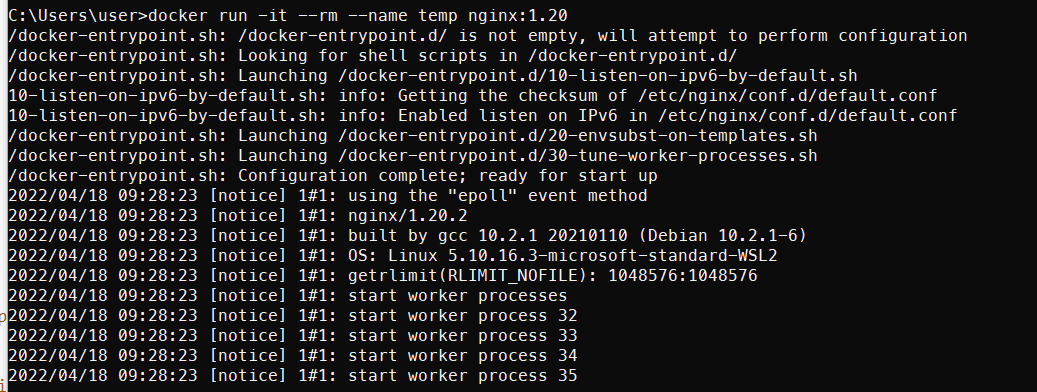
執行結果
後面有日期的那個是 nginx 開啟的訊息,可以看到 docker.entrypoint.sh 會把每一個執行的 .sh 顯示出來,真是貼心

後記

在寫 dockerfile 的時候都會覺得 entrypoint 的設計很困難,為了讓自己能寫一些不只自己能使用的 image, 參考這種官方的 image 感覺是挺不錯的 (不會的話先模仿別人總沒問題了吧!!)
其中在看這份 docker-entrypoint.sh 時,覺得最後一行 exec $@ 真是精隨,這樣就不會在使用者亂給 cmd 時顯示不該有的錯誤了 (當然也是搭配了上面的 if 來判斷才行)
這篇文章大概就到這邊,如果有大大發現我寫的內容有問題歡迎指正我~~

參考資料

find man page
stackoverflow: set -e
dockerhub nginx 頁面

nginx images 的 docker-entrypoint.sh 閱讀

https://raylin9981.github.io/2022/04/18/nginx/

作者

林禹志 RayLin

發表於

2022-04-18

更新於

2022-04-18

許可協議

評論